Before you start asks the reference A, the tuning system, the language, how notes are named, the instrument with its transposition and the tolerance. All of it can be changed later in Setup.
Use in this browser, or Install on your device where it is offered (a phone or tablet whose browser can install it, or an iPhone, where the app shows the steps in Safari's Share menu). Installed, the app has the whole screen and its own archive, and opened as the installed app the window has one button, Continue.
The browser asks for the microphone. Allow it. While it is open, the screen stays on. If it was refused, the chip under the map says so; tap it for the steps to turn it back on.
A short tour rings the main controls once. Setup › Account › Replay tour shows it again.
Always on screen
Element
What it is
Press
Logo
Top left.
Reloads the app. Not while recording.
Full screen
Android, in the browser only: hides the browser's bars.
Enters or leaves full screen.
Sign in / your name
Account state. Signed in, the part of the address before the @.
Opens Setup › Account.
Lite / Pro
Your plan, as the server last recorded it.
On Lite, opens the purchase.
Row of places
PlayStatsTunerSetup, at the foot. The lit one is where you are.
Goes there. A lamp shows while the metronome runs.
Back (phone)
Walks back through the places you came through.
On the map, leaves the app.
01 Play
The screen the app opens on. It listens as soon as the microphone is open: you can play and read the map without recording.
12345678910111213141516
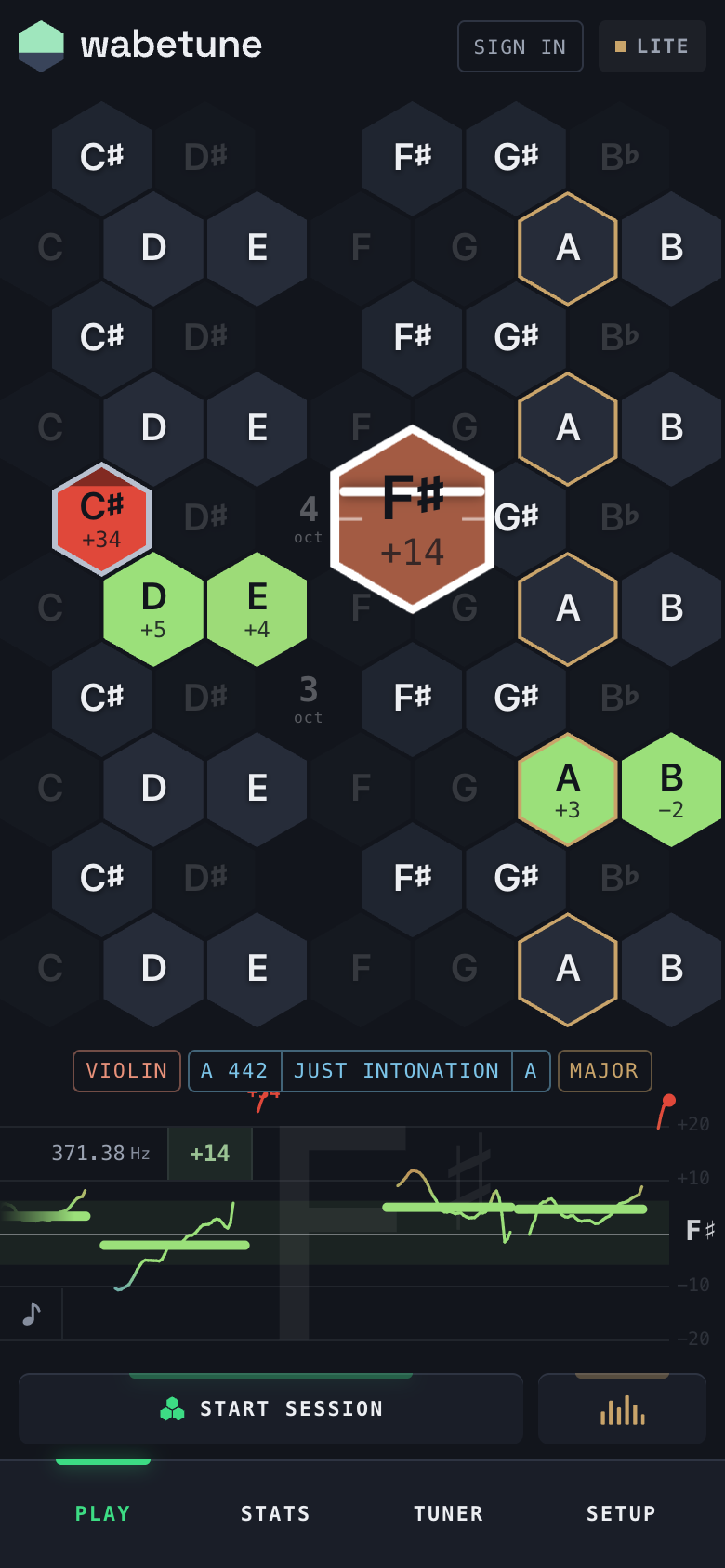
Logo reloads the app.
Account: Sign in or your name.
Plan: Lite or Pro.
Played cell: colour and cents of that note.
Note being played: drawn larger, white edge, needle across it.
Tonic: brass outline, in every octave. Only under just intonation and Pythagorean.
Dimmed cell: under a tonic, a note outside the scale of the declared mode (in C major E♭, A♭ and B♭; in minor the scale takes the raised sixth and seventh too). It is still played and measured, against its target; the ♭2 and the tritone have none, and are measured against equal temperament.
Octave number of the cells around it, shown on octaves where something was played.
Instrument chip: instrument and transposition.
Intonation chip: reference A, system and tonic.
Mode chip: major or minor; a tap turns it over.
Intonation trace: deviation over the last four seconds, with the hertz and the cents at its top left.
Swap: intonation trace ↔ staff, bottom left.
Start session: records.
Spectrum: every note at once, chords included.
Row of places.
The map
One hexagon per note, seven across. The rows alternate naturals and black keys and climb in octaves from the bottom. The map moves by whole octaves to keep the one you are playing on screen. Notes are written as your instrument reads them: with a transposition set, the map shows the written note.
Hold a hexagon and the phone sounds its note, at the target of the declared system. Keep holding: after half a second that note fills with brass from the bottom, in every octave, and after one more second it flashes and is the tonic (or the key, under a temperament). Let go before it is full and nothing changes. Held on the tonic itself, it turns its name over where the other name is a key in that mode too (E♭ minor ↔ D♯ minor, D♭ major ↔ C♯ major); where it is not (D♯ major would need nine sharps), nothing fills. Not under equal temperament, which has no tonic, and not while recording.
One A, from 45 cents flat to 45 sharp and back. Watch the colour, the needle and the pointed tip.
You see
It means
Grey
Not played.
Green, flat
Within your tolerance. No shading inside it.
Blue
Flat beyond the tolerance. Full at four times the tolerance.
Vermilion
Sharp beyond the tolerance.
Grey rim
Outside the tolerance, whatever the colour.
Dark tip
Direction: top vertex sharp, bottom vertex flat.
Number
Cents from the note's target in the declared system. Plus is sharp.
Needle
Only on the note being played. Centre is in tune; the top of the cell is +50, the bottom −50.
A note is the median of its readings, attack discarded. A cell is the average of the last three seconds played on that note, weighted by how long each was held. The report reads the whole session.
Not recording: a cell keeps its colour 30 seconds after the note ends, then fades in 5.
Recording: nothing fades until the session ends.
Very short notes count only inside a fast passage: 200 ms or more always counts.
Chips, trace, staff
Chip
Shows
Press
Instrument
E♭ clarinet | +3: name and transposition. Pulses while no instrument is chosen.
Opens Instrument in a window over the screen.
Intonation
A 442 | just intonation | A: reference A, system and tonic. No tonic under equal temperament.
Opens Intonation in a window.
Mode
major or minor, under every system but equal. In just intonation it moves the ♭7; elsewhere it changes how notes are written, the key signature included.
Turns it over.
♯ / ♭
Equal temperament only: black keys written as sharps or flats.
Switches between the two.
Intonation trace (default)Staff
Element
Meaning
Grid
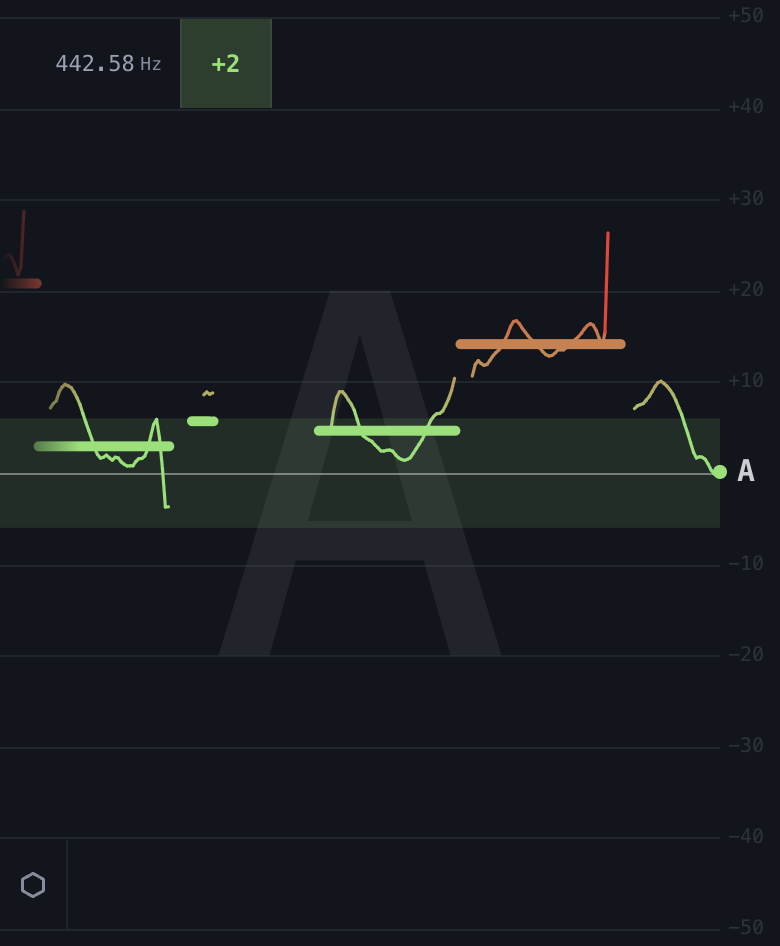
±20 cents, a line every 10. The strong line is zero. The band in the middle is your tolerance, and lights up while the note you hold is inside it. Past ±20 the line goes on out of the box, under the chips and the buttons, up to ±30.
Thin line
The pitch as you play it, at the needle's speed. Starts again at each note.
Thick dash
The median of each note the map kept, in the map's colour.
Note name
The note being played: large behind everything, and small on the right, on the zero line.
Staff
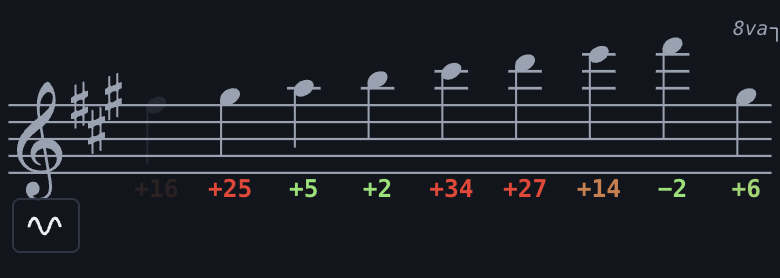
The notes in your instrument's clef, newest on the right, with the key signature of the declared key (none under equal temperament or C major). Cents beside each note, in the map's colour. A repeated note is written once.
Clef
Press it to go through the four clefs.
Corner sign / box
Press to swap trace and staff. The device remembers the choice.
Hertz
Beside the sign: where the note being played sounds.
Cents
Beside the hertz: how far the note is from its target. Green while it is inside your tolerance.
Messages under the map
One line at a time, in a chip between the map and the chips. The words lead to the cause; the × puts it away.
Nothing is loud enough to be heard
Move closer to the microphone.
Microphone refused
Tap for the steps to allow it in your browser.
Microphone interrupted · record again
The microphone stopped. Press record again.
Last notes all N cents · is the instrument in tune?
Everything leans the same way: check the A.
Everything is higher than this can read
Above the detector's range.
Tap to keep the screen on
Safari only: one tap anywhere keeps the screen awake while the app listens.
A new version is ready · tap to reload
An update was published while the app was open.
Recording a session
A session running: the button carries the waveform, the red dot and the time.
Action
Result
Press Start session
Recording starts. The map clears and keeps every note until the end.
Press the button again
The session ends and its report opens.
Back from the report
The map as the session left it.
Play a note on that map
The map clears and listens again, as after New session. It does not record: press Start session.
Spectrum cannot be opened while recording.
No notes: no report, a line under the map says so. Only a handful: the report opens but the session is not kept, and the report says so.
Lite: 15 sessions. When they are used, the button reads No sessions left · Go Pro.
The report
Opens when a session ends, and from the list of sessions in Stats.
123456789
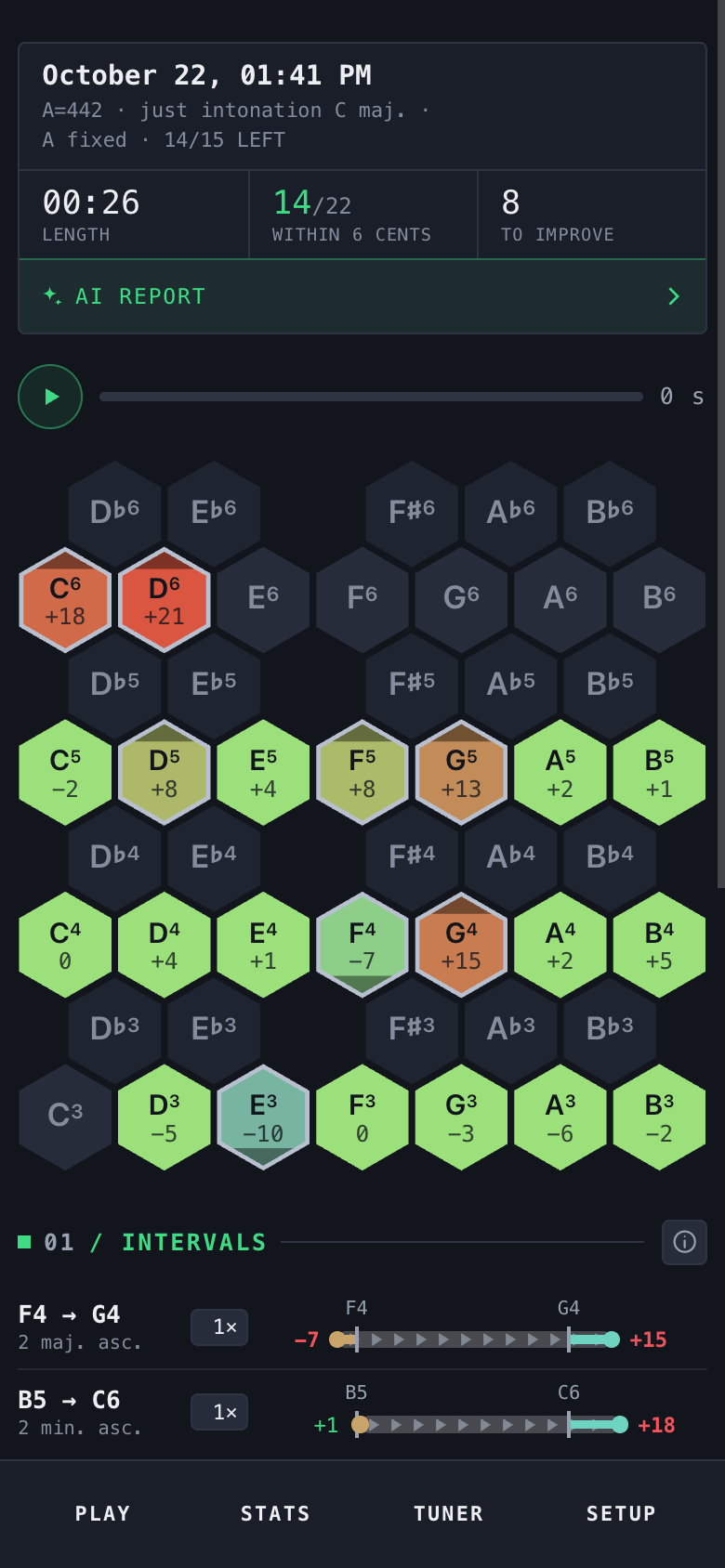
Date and time of the session.
Measured against: A, system, tonic, what stays fixed, transposition if any. Fresh from a session on Lite, the free sessions left (14/15 left).
Length, mm:ss.
Within N cents: pitches inside your tolerance / pitches played.
To improve: pitches beyond the tolerance.
AI report: the session in sentences, note by note and interval by interval, and the note to start from.
Replay: plays the recording back and redraws the map as it was at each moment. Only while the recording is in memory: until the next session or a reload. The recording is never stored.
Map of the session. Press a played cell, then press again to remove that note from the report.
Intervals, then Notes: see below.
Replay: the map refills in the order you played.
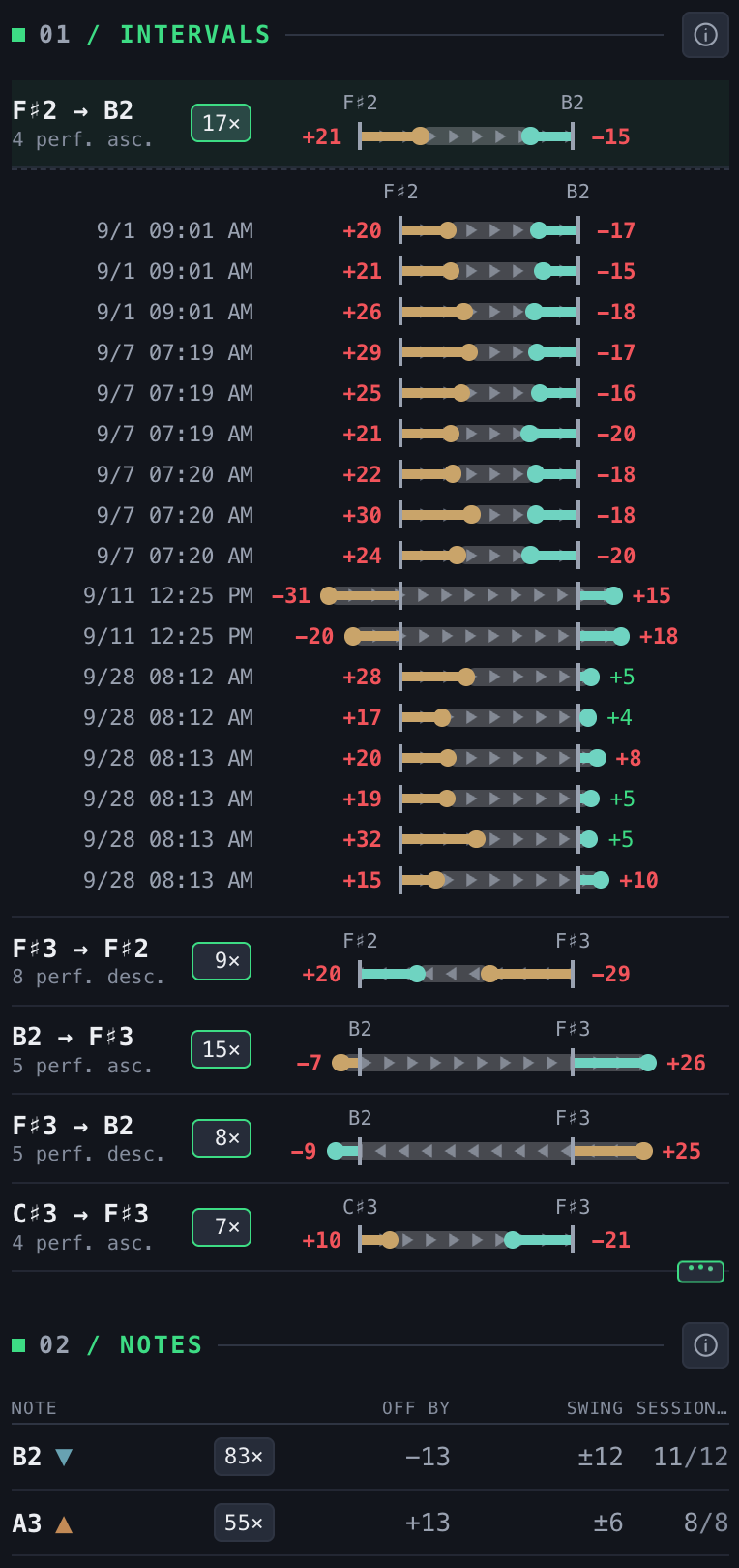
Intervals
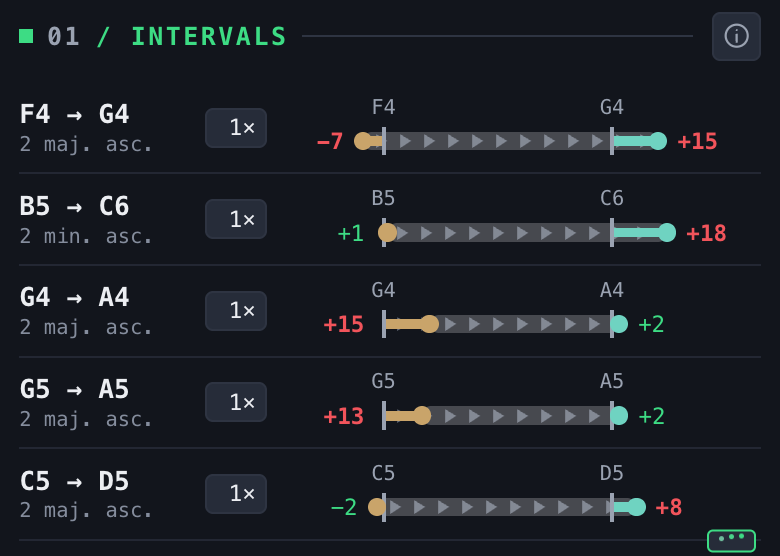
F4 → G4
Two notes in the order played, octave included.
2 maj. asc.
Interval name and direction.
1× box
Times the pair was played. Press: every time, with how far into the session (in Stats, the date and hour).
Strokes
Where the two notes sit in tune. Lower note on the left.
Dots
The notes as played: first, second. Triangles point the way the interval went.
Figures
Cents of each note: green inside the tolerance, red beyond.
Bar length
Longer than the strokes: wide. Shorter: narrow.
Notes
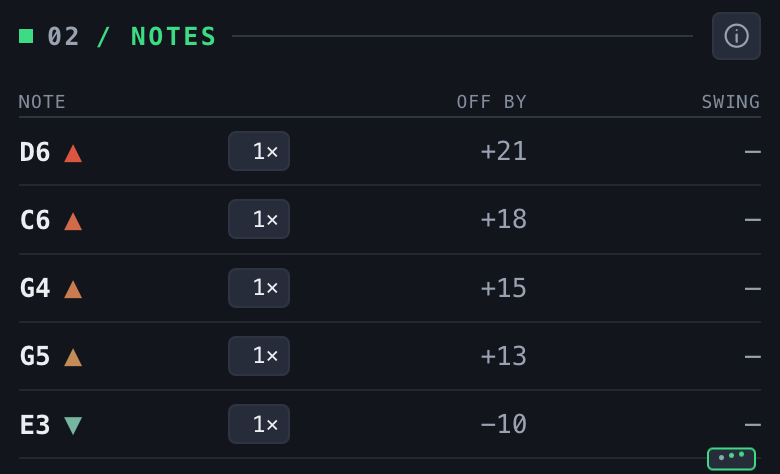
Note ▲ ▼
Notes beyond the tolerance. ▲ runs sharp, ▼ runs flat, in the map's colour.
2× box
Times played.
Off by
Median of every attempt, in cents.
Swing
How much it varies from one attempt to the next. At equal deviation, the harder one to fix.
Order: what weighs most first, how far beyond the tolerance times how many times.
Five rows show; the ••• under the list shows five more. The ⓘ beside a title explains the list.
Foot of the report
New session
Back to the map, ready to record.
Discard
Throws the session away. Undo is offered for six seconds.
Spectrum
Every note sounding at once, for chords, double stops and ensembles. Opened by the Spectrum button beside the record button; the narrow map button beside it goes back. It does not record.
A quartet in just intonation, with one A left equal on purpose.
Keyboard
Pitch axis, low at the bottom. The tab on the left edge hides and shows it.
Traces
Each note heard, scrolling right to left, coloured like the map.
Lower row of a label
Note and cents from the declared system.
Upper row
In a chord: degree over the root and cents from the pure interval. The root shows 1 ref.
Name at the top
The chord, over the column of labels.
Fourths and fifths
Two notes alone at a fourth or a fifth are measured as a chord of two, against pure.
The first opening downloads the analysis model (about 0.7 MB).
Lite: two minutes a day. Pro: no limit.
02 Stats
Every session kept, over a window of time you choose. The figures are the report's, gathered.
12345678910111213
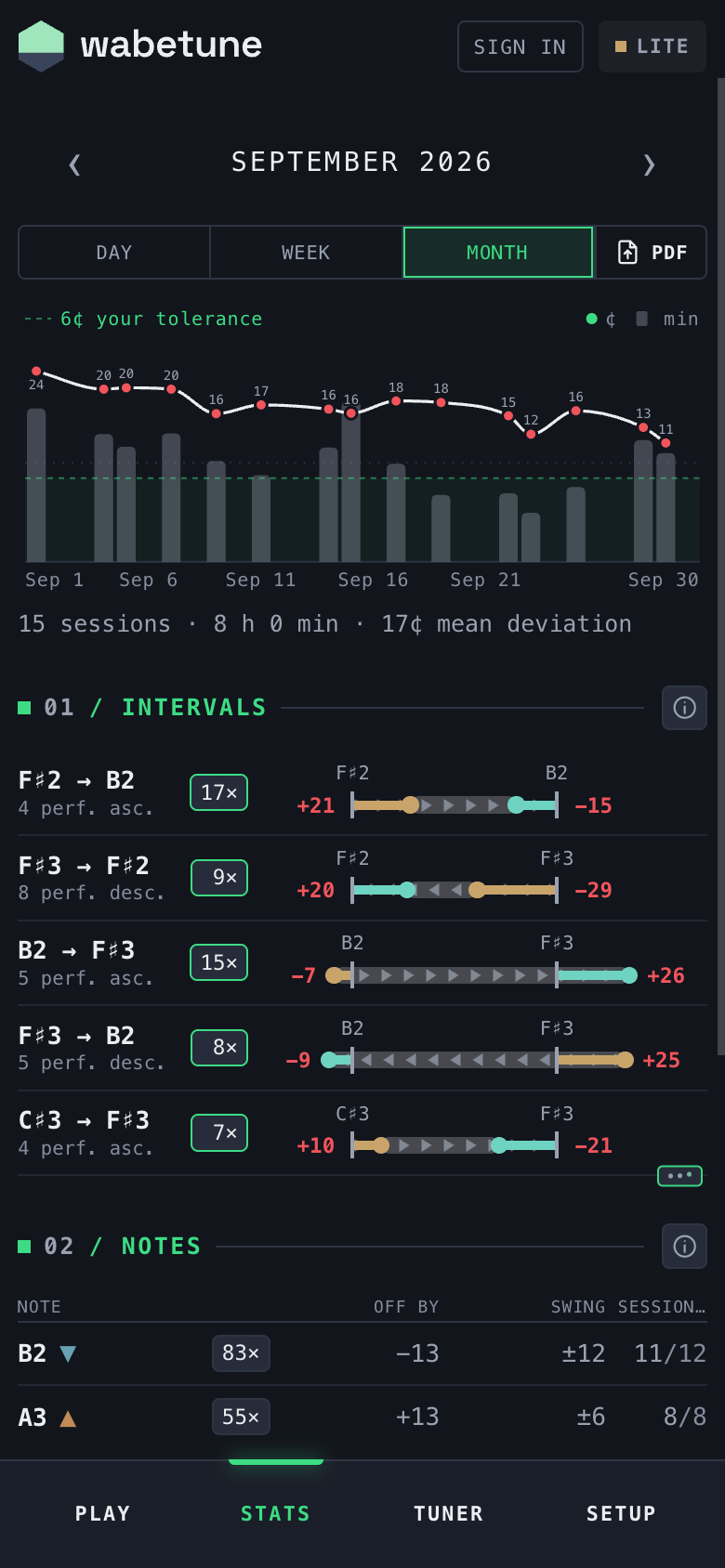
‹ › step to the previous or next window.
The window on screen: a date, a week, a month.
Day · Week · Month: the window's size.
PDF: the window as a PDF, to the phone's share sheet. For your teacher.
Dashed line: your tolerance.
Line and dots: mean deviation in cents.
Bars: time played, in minutes.
Totals: sessions, time, mean deviation.
Count box, green edge: press to open every time the pair was played.
Sessions out: in how many of the sessions that had the note it came out beyond the tolerance (11/12).
An interval opened: each time, with date and hour.
Lists
Intervals
Pairs whose median is beyond the tolerance and most of whose times went the same way.
Notes
Notes that came back often and were off the same way most times. Columns: times, off by, swing, sessions out.
One list per system
Sessions under different systems or keys are never averaged together. A title separates them when there is more than one.
Sessions
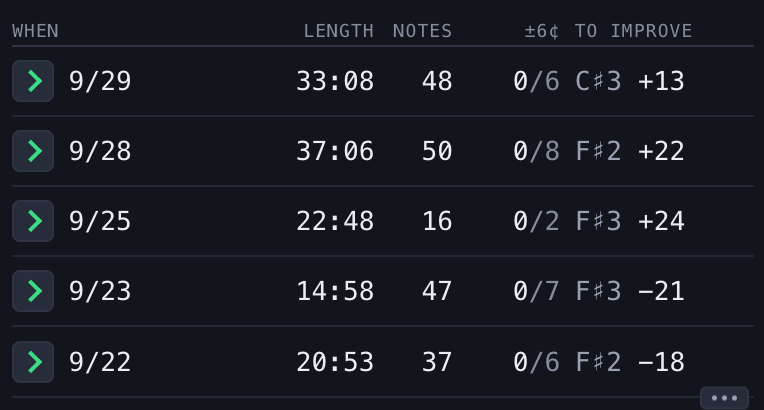
› + date
Opens that session's report.
Length · Notes
Duration and notes kept.
±6¢
Pitches within the tolerance / pitches played.
To improve
The worst note and its deviation.
With no sessions yet, Stats shows a drawn example, marked as such.
The PDF keeps one table per system, tonic, A and transposition; sessions measured otherwise are counted, not averaged in.
03 Tuner
One cell of the map, large and alone, and a metronome under it.
12345678910111213
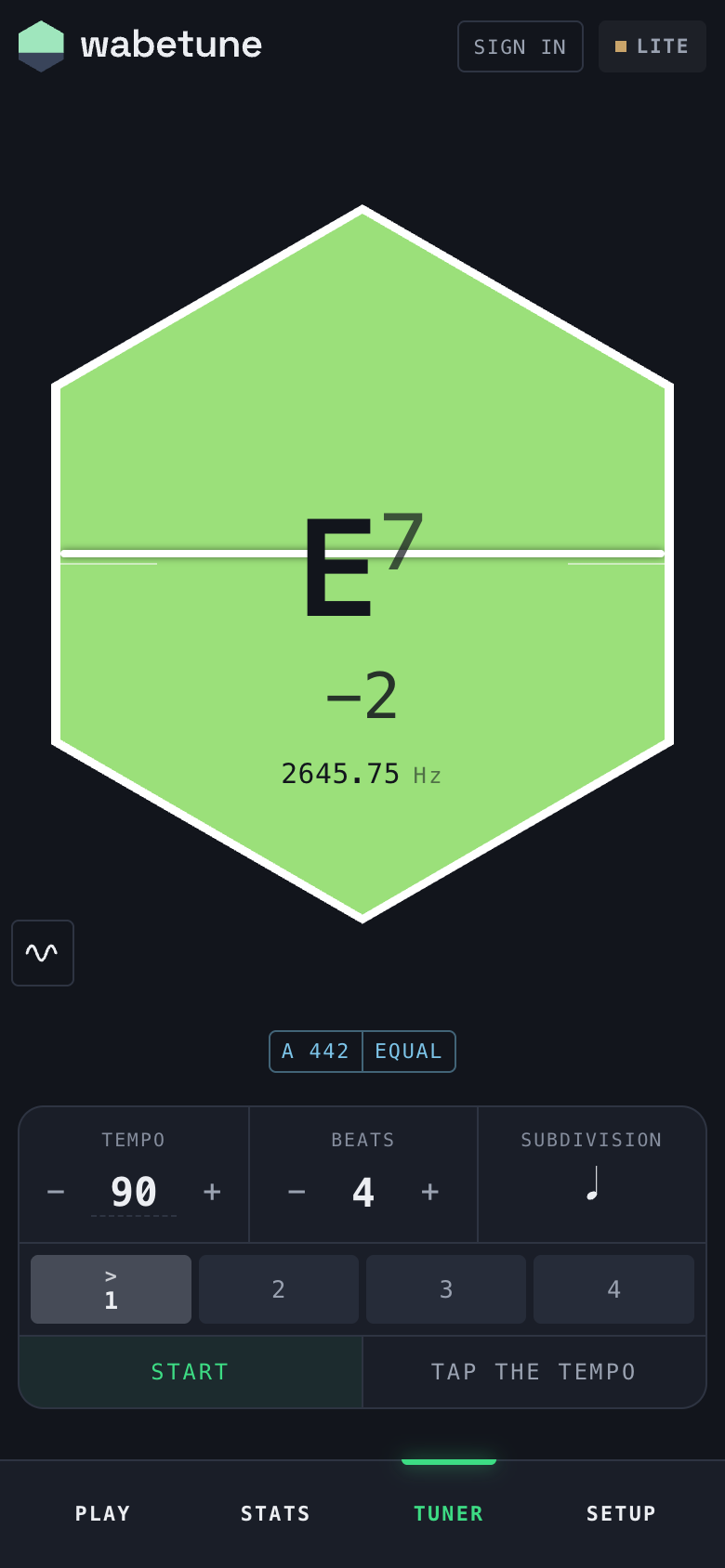
The cell: same colours and tolerance as the map. Play a note when silent.
Needle: centre in tune, up sharp, down flat. Full height ±50 cents.
Note and octave.
Cents from the target of the declared system.
Hertz as heard.
Swap: hexagon ↔ intonation trace, bottom left. The Tuner opens on the trace; the device remembers the choice.
Intonation chip: opens Intonation.
Tempo, 40 to 208: − / +, or press the figure and type it. On a phone the app's own pad comes up from the foot and covers nothing that moves: ✓ sets it, a press outside leaves it.
Beats in the bar, 1 to 12.
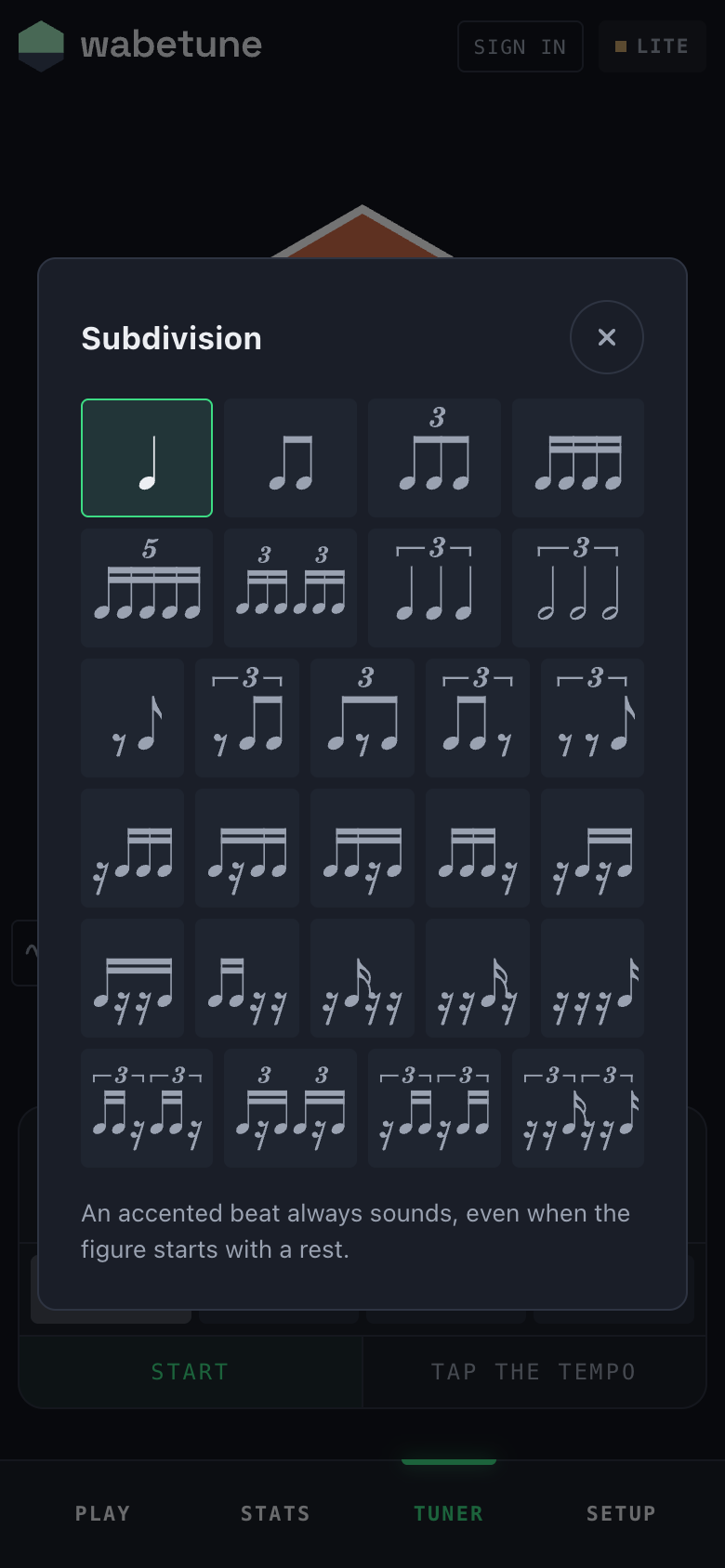
Subdivision: opens the sheet of figures.
Beat bars: one per beat. Press: accented → on → silent.
Start / Stop.
Tap the tempo: tap in time to set it.
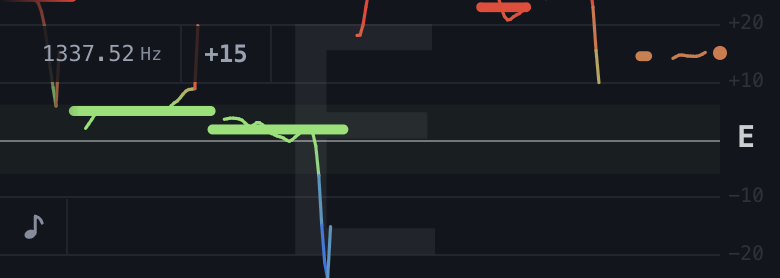
The Tuner opens on the intonation trace of Play, the whole width of the screen: the same line, dashes and letter, at ±50 cents, a line every 10, and the hertz beside the sign. Press the trace or the sign for the hexagon above.
Intonation trace in the Tuner
The tuner following a scale.The bars light on their beat; the first is accented.
The metronome
27 figures fill the beat, those without rests first. A rest is counted, not clicked.
An accented beat always sounds, even when the figure starts with a rest. A silent beat is silent with its subdivisions.
It keeps running when you leave the Tuner, with a lamp on the row of places. It runs through a recorded session; its clicks fall where the app is not listening.
Volume: the phone's buttons.
The device remembers the figure. Tempo, beats and marks start fresh each time.
04 Setup
One screen, six numbered sections. The chips on Play and Tuner open the same sections in a window.
01 Account
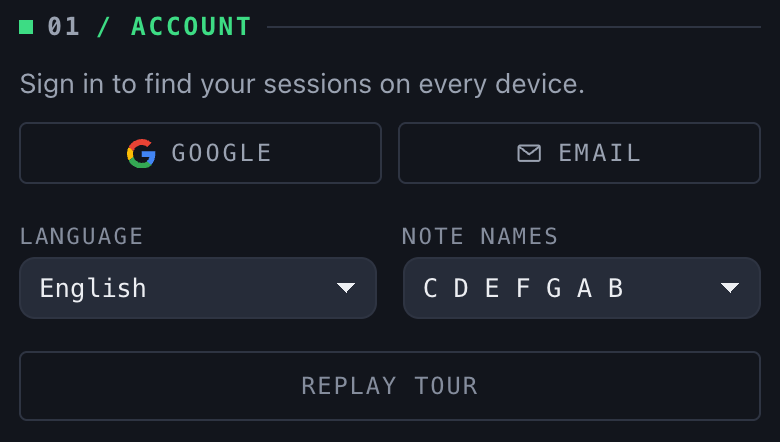
Google · Email
Two ways into the same account. Email sends a six-digit code to type here. Signed in, your sessions sync to every device.
Disconnect
Syncs; if everything reached the server, empties this device's archive.
Language
English, Italiano, Español, Français, Português, 中文, 日本語. Reloads the page.
Note names
C D E or do re mi. Reloads the page.
Install wabetune
When the browser allows it.
Replay tour
Shows the tour again.
02 Instrument
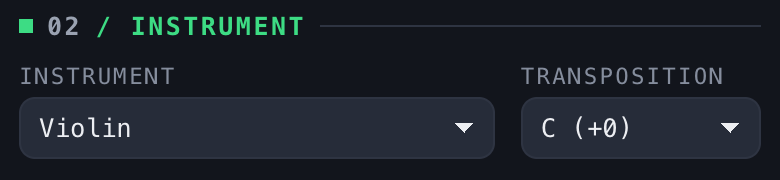
Instrument
Sets the clef of the staff. Choosing one fills in its transposition.
Transposition
What a written C sounds, B♭ (−2). Change it by hand for a part in another key (an A part on a B♭ clarinet).
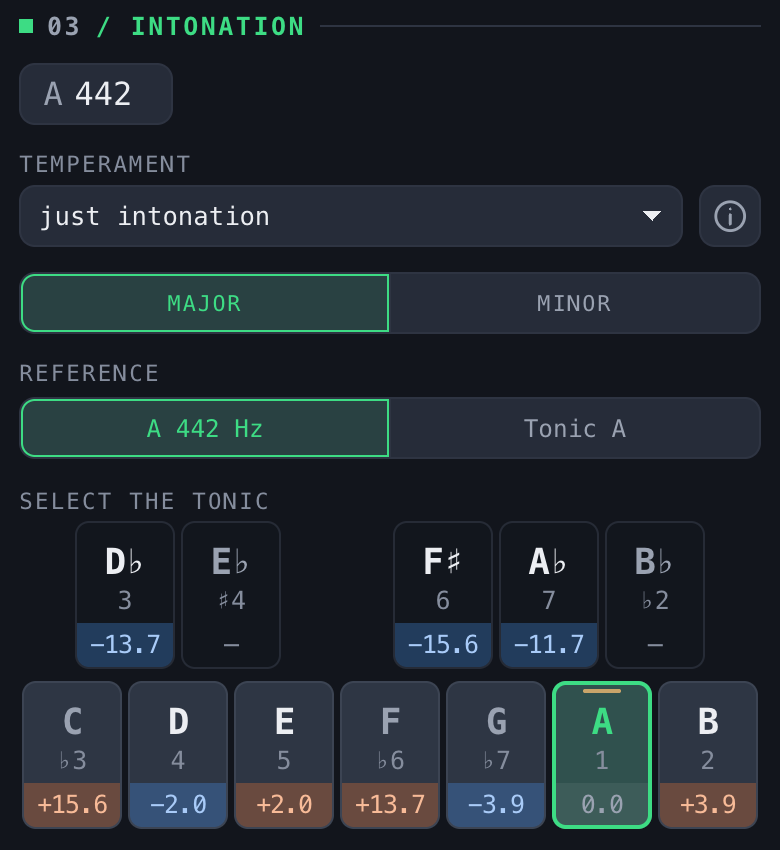
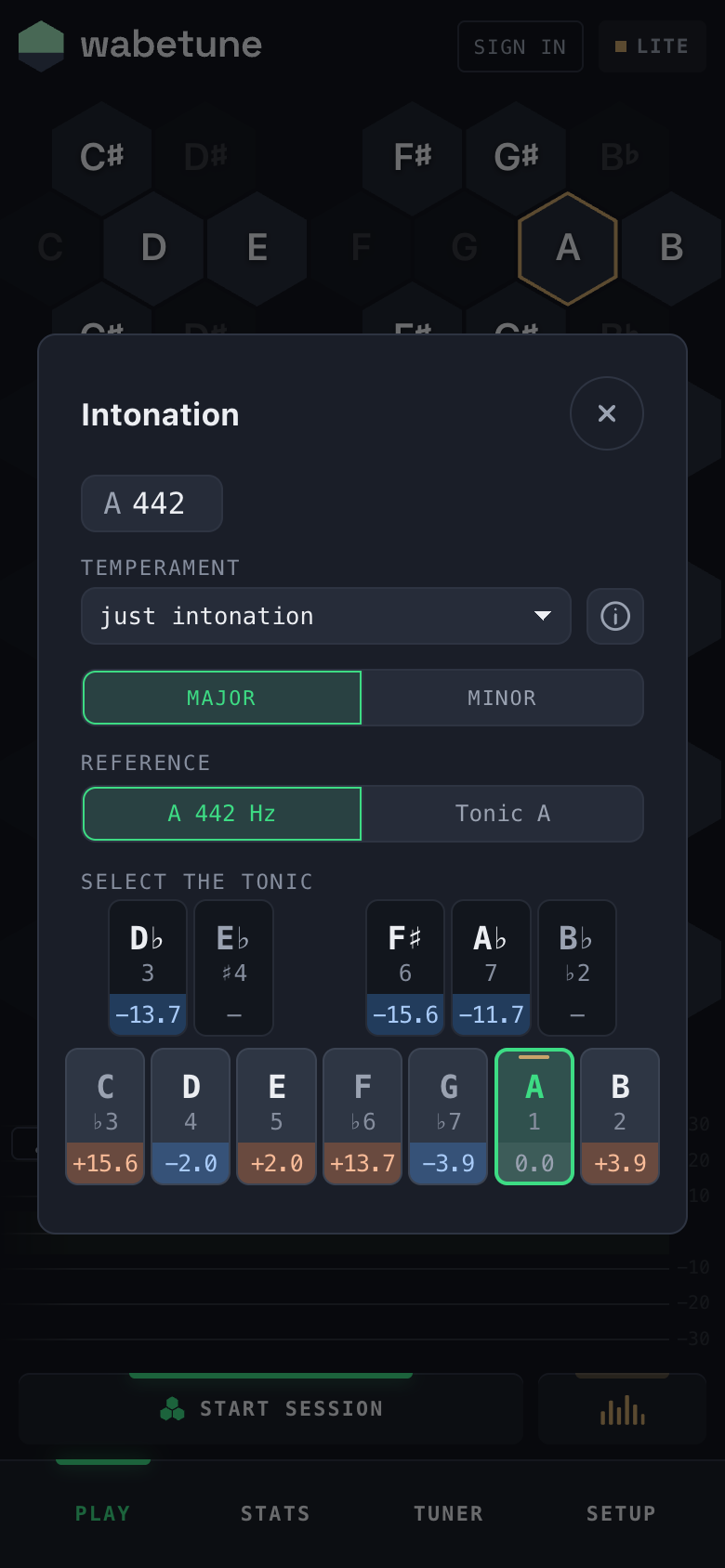
03 Intonation
A
Reference pitch in hertz, typed (on a phone, on the app's own pad, 390 to 460). Changing it clears the map: what came before was measured against another A.
Temperament
Eight systems in two families (list). ⓘ: construction, period, when to choose it.
Major · Minor
Every system but equal. In just intonation it moves the ♭7; elsewhere only how notes are written. The mode chip under the map does the same.
Reference
Under a system that is not equal, which note stays put: A 442 Hz keeps the A at its hertz, Tonic D keeps the tonic at its equal-tempered pitch. A brass line marks that key at its top.
Keyboard
One octave, the black keys in a row of their own over the white ones. On each key its name, its degree and, in the band at its foot, its cents from equal temperament: blue below, orange above. Press a key to make it the tonic. A key is written as the chosen mode writes it (D♭ in major, C♯ in minor); where the other name is a key too, press it again for that one (E♭ / D♯ minor).
The cents on the keys are a difference from a piano, not a verdict. Played at its own target, every note reads 0 on the map.
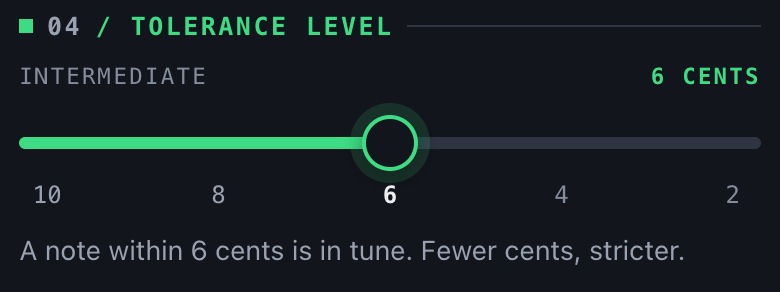
04 Tolerance level
Level
In tune within
Beginner
10 cents
Mid
8 cents
Intermediate
6 cents (default)
Advanced
4 cents
King
2 cents
It moves the colours, the lists and the trace's band. Not what is measured.
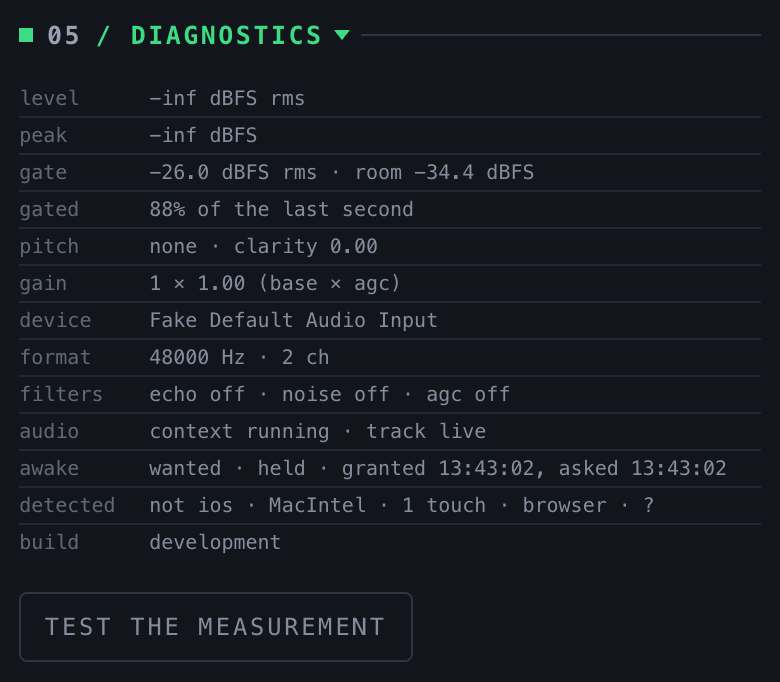
05 Diagnostics
Folded. Press the title to open it.
Figures
Live: level, peak, gate and room noise in dBFS, pitch and clarity, gain, device, format, browser filters, audio state, build. A screenshot of this is what support asks for.
Test the measurement
Two presses: volume up, phone on a table, then 15 seconds of clicks and tones measured by the phone itself. Result: consistent or not, and a code (D-7DPSED) to quote when you write to us. No sound, device name or address is sent.
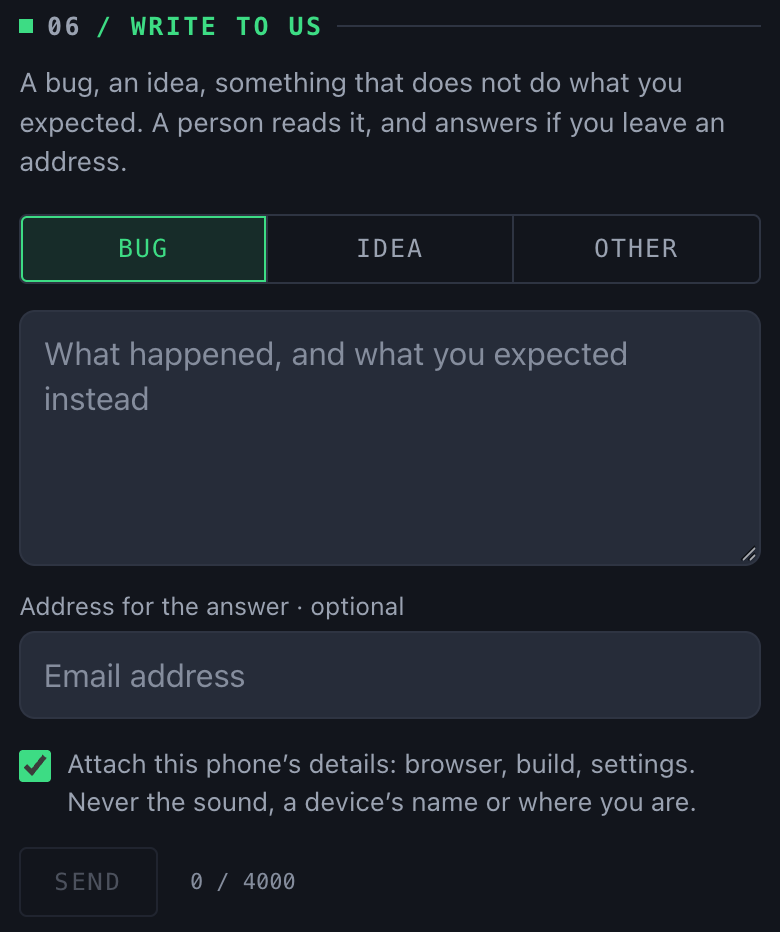
06 Write to us
Bug · Idea · Other
What the message is.
Message
Up to 4000 characters. The draft stays on the phone until it is sent.
Address
Optional. Without one, no answer.
Details
Browser, build and settings, on by default. A self-test from the same visit goes with it.
No account needed.
The chips' window
Pressing a chip on Play or Tuner opens its section of Setup in a window over the screen you are on. The controls are the same ones; a change there is a change in Setup. Close with ×, the backdrop or Back.
05 Reference
Tuning systems
Family
Systems
Needs
Counted from a tonic, follows the key
Just intonation, Pythagorean
A tonic and a mode
Fixed to the keyboard
Equal (default)
Nothing
Fixed to the keyboard
¼-comma meantone, ⅙-comma meantone, Vallotti, Werckmeister III, Kirnberger III
A key, C by default
The declaration applies to the whole session. For music that modulates, declare equal temperament and read the swing. Just intonation, with the numbers.
Words
Cent
A hundredth of an equal semitone.
Target
Where a note should sit under the declared system, A and tonic.
Tolerance
How many cents from the target still count as in tune.
Off by
Median deviation of a note over its attempts. Plus is sharp.
Swing
Spread between attempts: consistency.
Pitch
A note in a given octave: one cell of the map.
Session
What is recorded between the two presses of the record button.
Lite and Pro
Lite
Pro
Sessions
15
No limit
Spectrum
2 minutes a day
No limit
Map, tuner, metronome, report, Stats, PDF, sync
Yes
Yes
Price
Free
€4.99 once. Full refund within 14 days.
The plan belongs to the account: sign in before buying.
 1
2
3
4
5
6
7
8
9
10
11
12
13
14
15
16
1
2
3
4
5
6
7
8
9
10
11
12
13
14
15
16

 1
2
3
4
5
6
7
8
9
1
2
3
4
5
6
7
8
9
 1
2
3
4
5
6
7
8
9
10
11
12
13
1
2
3
4
5
6
7
8
9
10
11
12
13
 1
2
3
4
5
6
7
8
9
10
11
12
13
1
2
3
4
5
6
7
8
9
10
11
12
13